Showing posts with label iPad. Show all posts

Wednesday, June 28, 2017

This is so Easy

Earlier this month, my octogenarian mother had to give up her defunct decade-old MacBook that she inherited from my father. Before 2007, she had never sent or received an e-mail – so high tech is still new to her. My sister and I were a little hesitant to move her from her laptop to an iPad due to the UX change, but it's working out better than expected.

Today, she called me asking about the Epley Maneuver on YouTube. She called on a POTS line and then I switched the call over to a FaceTime video call, which she enjoyed. After I told her how to watch the YouTube video that I sent her ("Simply click the link in the e-mail, mom.") I then told her how to hang up and she enthusiastically said, "This is soooo easy." There was almost a hit of "why didn't you switch me to an iPad sooner" in her voice.

Innovation is something that reduces the cost of a transaction in terms of time or money. And that's exactly what the iPad has done for my mother.

Wednesday, September 9, 2015

Apple Pencil

Yes, when the iPhone was introduced by Steve Jobs, in 2007, he panned the stylus since the iPhone used a touchscreen. Now, Apple's announced the Apple Pencil which is a stylus for the iPad Pro, seemingly reversing Steve's original convictions, and some news sites are harping on that.

There are two points to take note of. First, Steve's changed his stance (publicly) on other features Apple shipped. For example, he pointed out that no one wanted to watch video on a tiny iPod Classic screen, and then he allowed video playback in a future iPod.

My second point is more salient in that, early PDAs required a stylus just as today's computers require a mouse or trackpad. And, now, just as a creative person would buy a Wacom pen tablet, so will they buy an Apple Pencil. Optional, yet empowering.

What did I think of the rest of today's keynote?

Friday, January 10, 2014

Stump the Apple Genius With iOS E-mail Issues

I stumped an Apple Genius with an iOS 7 e-mail issue. Simply put, the e-mails I sent from different accounts on my iPad disappeared. I'd click send and the Mail app didn't even appear to try to send out my e-mail – it was as if I had hit delete instead of send. The e-mails neither appeared in my drafts folder nor did they end up in my sent folder and they certainly weren't delivered to the recipient.

A quick search of the Web revealed this is an issue that hasn't been addressed by Apple. I was able to easily reproduce the bug for the Apple Genius and we tried several different things such as resetting my iPad followed by deleting and re-adding the e-mail accounts without any luck. The e-mails simply vanished when clicking send.

At this point, it's hard for me to figure out how long this has been an issue. Next up, I'll try resetting my iPad back to factory settings to see if that fixes the problem.


Saturday, August 3, 2013

Designing a Better Electronic Book

I love iBooks but nothing beats the durability of a real book. As great as it is to carry around my e-book library on my iPad, it can never compare to the feel of picking up a real book and flipping through it. That's a physical experience sorely lacking on all e-book readers.

So, can the real world feel of a book be duplicated electronically?

Perhaps.. one day... probably. The key is that a digital book would have to feel like a real book. One way to do this is with a digital book made of pages where each is a thin, flexible film, like e-paper, that feel like real pages.

Imagine an e-book full of a couple hundred blank pages made of thin, bendable computer displays. You'd select which book to load and each e-page would display a page of your book. You'd be reading e-ink text on real pages that you could flip through, highlight, take notes, etc.; much like iBooks or Kindle. Just don't dog-ear a page. For books longer than 200 pages, you could just cycle back – page 201 would appear on page one and so on. Now that would be best of both worlds.

Thursday, June 7, 2012

New Sandwich Shop, New Cash Register

This morning, my wife and I had breakfast at a new restaurant that just opened this morning. It's only a block away from our home and we'd pass by it frequently as they prepared for today's opening. We were the only customers in the restaurant since it was late in the morning when we went. But, we were told that business was moving along very nicely earlier in the morning.

When we bellied up to the counter to pay our bill, we couldn't help but notice that their cash register was an iPad connected to a cash till and credit card printer. They were excited to show off their high tech point-of-sale (POS) system which got me wondering if it was actually cheaper - in terms of total cost of ownership - than a traditional cash register.

Realistically, an alternative solution, like Square, seems practical when processing only credit cards on the go. A fixed POS system needs to securely store cash as well as process credit cards and it should be somewhat rugged.

A basic cash register, with a till, starts at about $200. Then add one or two hundred more for a printer and credit card swiper. On the other hand, a new iPad 2 (previous generation) starts at $399 plus the cash register app, printer and till will bump up the cost. A key benefit of an iPad POS is that it has more features and can collect more data than a basic cash register.

I still can't help but ponder how this will hold up. Even though most cash registers at retail chains are actually stripped down PCs which are networked into servers - I wonder if the iPad POS will work as expected or if it'll end up being more like a portable GPS system on your car's dashboard vice a navigation system built into your car. In other words, it's the difference between a dedicated tool for a specific job or, perhaps, a solution looking for a problem.

Of course, if the iPad POS was wirelessly connected to the kitchen - which I don't think it was - that would be a no brainer in terms of efficiency. But, regardless, the nicest benefit of a mom-and-pop shop using an iPad cash register is that they can take it home at the end of the day and use it for more proper iPad duties.

Sunday, May 20, 2012

iPads in Aviation

Charts and procedures for coast to coast flying.
iPad sales, in the first two years, have blown away the pace of iPod and iPhone sales. It took the iPod four years and the iPhone more than three years to reach today's cumulative sales of the iPad.

One area where the iPad has made a big difference is in aviation. While it's an insignificant market for Apple, it's a big deal for pilots. When pilots fly, they must "utilize all available information." One of the biggest hassles of flying is that a pilot needs to carry charts (maps), manuals, and books chock-full of airport details and procedures.

When I flew from California to New York, I had to carry a bin full of books and charts (pictured above) - about $200 worth. The most painful part is that nearly all of this paperwork expires every 60 days.

Flight Planning
My location on an airport approach procedure plate.
(click to enlarge) 
Today, as a private pilot with an iPad, I only need to pay a $150 yearly subscription fee to receive all of the charts and procedures for flying anywhere in the United States. Not only can I file flight plans, download new charts, procedures, and weather on the go, but I can also see my exact location on my iPad's charts, procedures, and taxiway diagrams.

I still need to pay about $300 for an annual data subscription for my plane's avionics navigation systems. But, having redundant systems for my situational awareness ensures that I should never get lost --- unless the GPS satellite network fails.

In the event of a GPS failure then we're back to navigating via radio beacons. Which, fortunately, my airplane has three separate navigation radios for this purpose. Hopefully, though, it'll never come to that.

The costs involved with paper and electronic subscriptions reminds me of an old joke...

How do you make a million dollars in aviation?
Start with two million.

Sunday, March 18, 2012

New iPad Gotcha

Yesterday, my wife bought the iPad 3 new iPad for me.

Today, she surprised me by buying the top of the line MacBook Air for me - I am loved, but I digress.

The new iPad has a very nice display - I definitely noticed the higher resolution right off the bat - and it runs snappier. It's just a bit heavier than the iPad 2, yet, significantly lighter than the iPad 1.

Data Plan Gotcha
There's one big gotcha. Don't simply swap the micro-SIM cards, like I did, to move your data plan to your new iPad. At best, that might work for a little while.

Traditionally, a mobile device's phone number and its wireless service is attached to the SIM card. But, with the new iPad - since we don't care about our phone number - the attachment is through the e-mail account associated with the data plan.

Also, the micro-SIM in the new iPad is a 4G specific micro-SIM. I tried swapping out the micro-SIMs and I ran into problems. The AT&T service displayed next the bars at the top of my new iPad screen showed 3G instead of either 4G or LTE. Time to call AT&T.

Doing it Right
If you're upgrading from an iPad 2 to the new iPad, you should probably call AT&T (1-800-332-0500) to make sure everything goes smoothly, especially if, like me, you've been grandfathered into AT&T's unlimited data plans.

The two AT&T customer service reps who I dealt with were stellar. They knew exactly what they were doing. Both of them told me that swapping the micro-SIM cards wouldn't work and took the time to explain how the process works. This level of service was a far cry better than someone simply parroting my problem, "So, you say that you're having a problem with your iPad?" and then reading a trouble shooting script over the phone. I felt like I was talking to an Apple employee on the phone who fully understood my problem. Hat tip to AT&T. I have yet to try my new iPad on LTE, but the rep told me that it's amazingly fast.

So, the bottom line is that I still have my unlimited data plans (yes, I know about the AT&T data throttling on both my iPhone and iPad) plus my wife is now the proud owner of my iPad 2 hand-me-down. She's the best.

Sunday, March 4, 2012

Apple Announcement

Apple is making an announcement in a few days. It's almost a given that it's going to be a new iPad. Let's call it the iPad 3 or the iPad HD since it's rumored to have a retina display along with a faster processor that has more cores.

Apple TV
What's more interesting is the speculation about Apple TV. The current version of Apple TV has stopped shipping. While there have been rumors about Apple shipping a full blown TV sometime this year, the most recent speculation is how Apple plans to break into TV broadcasting.

Last year, Steve Jobs told his biographer that Apple had licked the TV problem, meaning that they'd figured out an innovative way to distribute TV content. Apple wants TV channels to go a la carte. In other words, Apple wants to do for TV what they did for music: allow people to buy only the content they want without bundling in the extras. How would that work? One way would be to partner with the cable channels, or other content providers, and sell apps that would allow you to subscribe to specific channels.

Wouldn't it be great if we could pay for only the TV channels we want?

Friday, July 29, 2011

Don't Forget Your Pilot's Guides!

I recently upgraded my airplane's panel with an Aspen EFD1000 along with some other engine and transponder avionics. Now, instead of "steam" (analog) gauges, I get many of the benefits of a glass cockpit.

Since nearly all of the avionics have been replaced in my plane since it was built, the original airplane manual, which must always be on board the aircraft while in flight, is no longer current. The simplest solution to this problem is to carry the pilot's guides for all of the equipment that's been installed over the last four decades. Obviously, this can be bulky since it includes manuals for the autopilot, GPS, radios, PFD, transponder, engine monitor, tachometer, etc.

iOS to Lighten the Load
Since I never fly without my iPad and iPhone I realized that I could add the pilot's guides – which are all available in PDF format – directly to my iPad and iPhone.
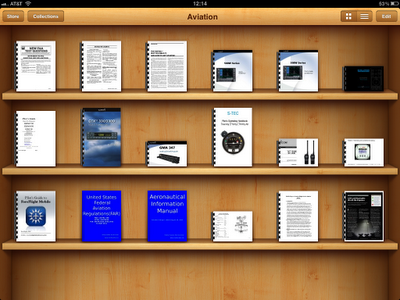


There are two simple ways to add a PDF to your iPad or iPhone so you can read them in the iBooks app:

1. E-mail the pilot's guides, in PDF format, to yourself as an e-mail attachment. When you receive the e-mail on your iPad or iPhone open the PDF attachment, click on the arrow in the upper right, and select Open in "iBooks" which will copy the PDF to iBooks. I've created another "collection", in iBooks, called Aviation, in addition to the two default collections (Books and PDFs), and moved my pilot's guides into this new collection.

2. Drag the pilot's guides, in PDF format, to your iTunes library. The next time that you sync your iPad or iPhone with iTunes, check that each PDF manual is selected under the Books tab, in iTunes, to be sure that it's transferred to your iPhone or iOS.

More Than You Bargained For
The beauty of having these PDFs on both devices is not just that I have two copies with me when flying, but also that I can bookmark pages on one device and those pages will be bookmarked on the other device after syncing with iTunes. Also, most of the hardcopy pilot's guides tend to be printed in black and white by the manufactures to save costs, but the PDFs are in full color.

Additionally, I can run a text search to find what I'm looking for in case I hadn't already bookmarked it. So, how do I lean out my airplane's engine, during cruise, to 100° rich of peak? No problem, it's a snap to find that page in my pilot's guide since I've bookmarked it.


But why stop with my pilot's guides since I also bought the FAR/AIM in the iBookstore, too? The only feature that's missing for the PDFs is that you can't highlight text, as you can in a regular iBook. So, my FAR/AIM, which is not a PDF, but, rather, a genuine iBook, is not only well bookmarked but also "highly" highlighted.

Monday, June 6, 2011

iOS 5 Just Increased Apple's Addressable Market By 5x

During this week's keynote address at Apple's World Wide Developers Conference (WWDC), Steve Jobs pointed out, with the introduction of iCloud, that Apple's iOS devices, such as the iPhone and iPad, can be standalone devices. In other words, you no longer need a personal computer to configure, set up, or update Apple's mobile devices.

This is more than just a great convenience and I don't think many people get it... yet.


Wall Street
Wall Street, as predicted, always wants more. Yesterday, investors were looking for a pleasant surprise like an iPhone 5. But it wasn't to be and Apple did its best to set expectations with last week's "preannouncement announcement" that this year's WWDC was all about software.

Investors were looking for things that Apple could sell and the most expensive WWDC announcement was that the next operating system version, Mac OS X Lion, which will cost $29.99. Apple also announced that iTunes Match will cost $25/year but everything else was free. On top of that, Apple will stop charging for MobileMe; so that's even more lost revenue.

Growing Market Share
In order for Apple to continue growing, it needs to sell more things and their best bet is to expand their market. Otherwise, just like the iPod, the iPhone and iPad market will become saturated. While Apple is great at making their own products obsolete, they still need to get bigger and iOS 5 is their answer.

In 2005, when you couldn't swing a dead cat without hitting someone listening to an iPod in the U.S. and Europe, I had the opportunity to live in East Africa. As an Apple employee, living in this poor part of the world, I was stuck by two things. First, was the obvious lack of iPods being used by any of the locals. Second, when it came to technology, their life revolved around their mobile phones. I was amazed at the advanced state of East African Cell Phones. They were texting well before it was popular in the U.S.

Leaping the Digital Divide
In a developing country, a $1,000 personal computer is nearly a year's pay when living on $3/day. But, poor doesn't mean that they don't want high tech solutions - I can't afford a yacht, but I'd still like one. The beauty of mobile phones is that even the poorest of developing countries already have the wireless infrastructure in place.

I can easily see people in developing countries skipping over personal computers, much the way they skipped over land lines, and acquiring standalone networked mobile devices, such as iPhones and iPads running iOS 5. Also, many of these people are unbanked, but with services like PayPal and Square, they can find ways to keep their money safe. It may sound strange, but, it's no stranger than when I saw Maasai, who lived in mud huts, pull out their cell phones to text money to each other... and that was six years ago.

Saturday, March 12, 2011

iPad 2 Launch, Part II

Covering the actual iPad 2 launch wasn't as interesting as covering the first person in line, the day before.

Friday, March 11, 2011

iPad 2 Customers Queue Up in Carlsbad

Last night, I starting gathering some background info for a story that I'm writing on today's iPad 2 launch at the local Carlsbad Apple Store. After interviewing the first person in line, Paul Yorke, he tweeted it out:

I was just interviewed by an AOL news organization called the Carlsbad Patch carlsbadpatch.com #inLine4iPad2less than a minute ago via Twittelator


My editor saw the tweet so we ended up running the story-before-the-story. It was my first real attempt at a video story incorporated into a written article; so the quality should only get better from here.

Thursday, February 10, 2011

The Future of Digital Publications

I have seen the future of digital publications and it looks like Flipboard and Livestand.

The challenge of distributing digital books has already been solved with the Kindle and iBooks. But, reading a book is a different experience than reading a digital newspaper or magazine. Books are read linearly whereas newspapers and periodicals are flipped through. While we might read a magazine article from beginning to end, how we discovered that article could have been through the random process of flipping.

Bad
I belong to two large associations which have both tried to distribute their magazines in a digital format. The problem is that both associations have chosen to use solutions like NXTbook or Issuu. Once you get to a page that you want to read you have to click to zoom in because the text is too small to read when viewing the entire page. Actually, each page isn't really text - rather it's a screenshot of the magazine's artwork - so you can't search for text, easily, or copy and paste it. If it's a multicolumn article, you then have to pan back up to the top next column to continue reading. These solutions are basically an online version of microfilm.


There are several other problems with this user experience. First, the magazine rendering is CPU intensive, so it's slow to initialize, turn pages, and it doesn't work well on older computers. Also, since it's just screen shots of the magazine pages, there's no multimedia such as video or audio.

This solution is a clear cut example of a case that violated a key rule in UI/UX: Start with the UX and then work back to the technology.

Good
The Daily and Project provide good user experiences since they're designed specifically for the iPad and they have rich multimedia. However, the content can only be displayed on the iPad. If you send an article from The Daily to someone without an iPad, all that the recipient will see is a humongous screen shot of the entire article as rendered on the iPad.


Better
Flipboard currently provides the best experience that I've seen. I love that I can read a blog, using Flipboard, simply by pointing it at the blog's Twitter stream or Google Reader.


There are two distinct ways in which publication media is distributed and consumed. One way is through batch publication, such as a daily or monthly publication. Both The Daily and Project use this technique. The other way is through continuous updates, i.e. a river of news, such as most blogs, CNN.com, etc.

The problem with batch publishing is that you can't easily go back to a previous issue's article. If you missed it, then you missed it. The nice thing about a river of news is that you can back up in your river to pickup where you left off.

Best
The ideal solution is an open format (such as RSS or ePub) so that the content can be best displayed depending on the medium. Consuming a slightly customized RSS feed via an application similar to Flipboard is how I envision the implementation - let's call it a Digital Publication Feed (DPF).

It would work by pointing a Flipboard-like application at a web site for automatic detection of the DPF (similar to how my web browser automatically finds the RSS feed when visiting cnn.com). The DPF would be an RSS feed standardized for the digital publishing industry with a few special tags, such as <hed>, <dek>, <byline>, <lead>, <text>, <video>, <audio>, plus other metadata to give any third party consuming application the ability to render news articles. There could even be tags for handling comments and ad revenue sharing.

The DPF is a fairly simple concept, but the beauty is that it would work well across different devices and, most importantly, it would be a standard.

Worst
While generating ad revenue is vital, it's important that ads don't get out of control. Leading newspapers don't plaster ads on the front page of their printed papers. Yet, if you look at the newspaper industry's attempts to monetize the web you'll find web sites where a single article stretches across multiple pages for the sole purpose of increasing advertising CPM. At least, with an interstitial ads, the reader only needs to click once to get beyond it.

My final pet peeve is with news sites where the actual content of the article is completely below the fold. You can't even begin to scroll down to the actual article until the multiple instances of the Flash players finish loading and begin rendering their flashing ads.


P.S. - I wonder if it's called Flash because so many ads now flash using Flash? (That's a joke.)

Sunday, June 13, 2010

AT&T Notifies Customers of Privacy Hack

Tonight, I received the following e-mail from AT&T's Chief Privacy Officer.

June 13, 2010

Dear Valued AT&T Customer,

Recently there was an issue that affected some of our customers with AT&T 3G service for iPad resulting in the release of their customer email addresses. I am writing to let you know that no other information was exposed and the matter has been resolved. We apologize for the incident and any inconvenience it may have caused. Rest assured, you can continue to use your AT&T 3G service on your iPad with confidence.

Here’s some additional detail:

On June 7 we learned that unauthorized computer “hackers” maliciously exploited a function designed to make your iPad log-in process faster by pre-populating an AT&T authentication page with the email address you used to register your iPad for 3G service. The self-described hackers wrote software code to randomly generate numbers that mimicked serial numbers of the AT&T SIM card for iPad – called the integrated circuit card identification (ICC-ID) – and repeatedly queried an AT&T web address. When a number generated by the hackers matched an actual ICC-ID, the authentication page log-in screen was returned to the hackers with the email address associated with the ICC-ID already populated on the log-in screen.

The hackers deliberately went to great efforts with a random program to extract possible ICC-IDs and capture customer email addresses. They then put together a list of these emails and distributed it for their own publicity.

As soon as we became aware of this situation, we took swift action to prevent any further unauthorized exposure of customer email addresses. Within hours, AT&T disabled the mechanism that automatically populated the email address. Now, the authentication page log-in screen requires the user to enter both their email address and their password.

I want to assure you that the email address and ICC-ID were the only information that was accessible. Your password, account information, the contents of your email, and any other personal information were never at risk. The hackers never had access to AT&T communications or data networks, or your iPad. AT&T 3G service for other mobile devices was not affected.

While the attack was limited to email address and ICC-ID data, we encourage you to be alert to scams that could attempt to use this information to obtain other data or send you unwanted email. You can learn more about phishing by visiting the AT&T website.

AT&T takes your privacy seriously and does not tolerate unauthorized access to its customers’ information or company websites. We will cooperate with law enforcement in any investigation of unauthorized system access and to prosecute violators to the fullest extent of the law.

AT&T acted quickly to protect your information – and we promise to keep working around the clock to keep your information safe. Thank you very much for your understanding, and for being an AT&T customer.

Sincerely,


Dorothy Attwood
Senior Vice President, Public Policy and Chief Privacy Officer for AT&T

Wednesday, June 9, 2010

What do you mean my iPad is "Not Charging"?


I was highly disappointed the first time I plugged my iPad into my MacBook Pro. My laptop is a little long in the tooth, but I didn't expect it to indicate "Not Charging". I thought, for sure, that it was just a bug until I did a little digging. It turns out that the iPad pulls more power than my MacBook delivers over its USB connection. I've seen problems like this, in the past, when plugging into low power USB ports typically found on keyboards. These keyboard ports were only designed to power mice not recharge an external device. So it's surprising that the iPad wouldn't charge when plugged directly into my MacBook.

Well, it turns out that the "Not Charging" message isn't entirely true. The iPad in the screenshot, above, had about an 81% charge when I plugged it in and now, several hours later, it's at 100%. I guess it's just a trickle charge.

Update: Great point from SteamAtom in the comments, below. It seems, in my case, that the iPad is only charging when it's sleeping. As soon as I turn it on it stops charging.

Tuesday, June 8, 2010

Apple's Knowledge Navigator and the iPad

More than 20 years ago, Apple envisioned the Knowledge Navigator in the form of a tablet computer. Using hypertext, video conferencing, and artificial intelligence (AI) made the Knowledge Navigator a perfect personal assistant. The tablet form factor of the iPad (and maybe even the iPhone) would be ideal, but the technology just isn't possible, yet.


The key to the Knowledge Navigator is its AI. Advances in this area are slow due to the complexity of mimicking a human and getting it to pass the Turing Test. Keep in mind that it took mother-nature more than four billion years to create human intelligence.

Tuesday, June 1, 2010

Two Million iPads Sold


It's been less than two months since the iPad went on sale and Apple has sold more than two million. It first become available this past Friday overseas - but, Apple doesn't break down their sales figures by market.

I really love mine. It's actually good enough to use for word processing. I recently wrote an article on it, using the wireless keyboard, without any problems.


Here's a statistic that I came across which shows the growing usage of the iPad for surfing the web. What's most interesting is that usage seems to spike on the weekends.