Showing posts with label Branding. Show all posts

Monday, October 12, 2015

The Apple Way of Design and Marketing

1 Infinite Loop: The Mothership
I figured, "Why not toot my own horn?" and brag about my Apple speaking engagements. I'm surprised how well it's been received, probably because it touches on a some key design, marketing, and branding topics.

I've given The Apple Way of Design and Marketing presentation a number of times, mainly to Chinese delegations of business people touring America's tech companies. Having worked at Apple, I forget the allure of how the company looks from beyond Infinite Loop and what makes Apple unique. Like a beautiful photo, things look amazing from the outside, where you wish you could touch the magic, on the inside.

My presentation touches on a variety of topics such as: why the Apple logo used to be upside down, to Apple's sophisticated unifying branding techniques, to simplifying UX and technology processes, along with Apple's brilliant decisions and mistakes.

Thursday, May 26, 2011

Souplantation Express

For lunch, today, I tried the new Souplantation Express in Carlsbad. I've been to other Souplantation buffet restaurants, many times, but the Express version is a bit different.

For starters, it's much smaller than a traditional Souplantation restaurant and instead of making your own salad, the employees make it for you. The process will remind you of a Subway restaurant as you slide down the serving line and your order is handed off from employee to employee.

Expectations
Since this employee-serve model is so different than the tradition self-serve model, I wonder why they chose it since the benefits are not obvious to the customer. Perhaps there's a business savings?

The gold standard for service expectations at Souplantation Express has been set by the traditional Souplantation. Anything that's of lesser quality will dilute the Souplantation brand, at least in the short term.

Getting Used To It
Most people, who walk in the door of the new Souplantation Express, for the first time, are surprised to see that it's not a traditional self-serve buffet and things may seem to move slower (perhaps naming it Souplantation Mini would have better set expectations).

The Souplantation Express is prefect for call-in orders to-go. But, it'll take a little getting used to if you're going to go through the serving line, yourself. It reminded me of when McDonalds first opened their fast food restaurants, with drive-thrus, in China. Locals didn't understand exactly how they worked and, after driving through and picking up their meal, they'd park, get out of their car, and go inside the restaurant to eat it.

My Experience
When I visited for lunch, there were 12 customers on line and about five employees serving food. At a traditional Souplantation, 12 customers can serve themselves faster than five employees can serve 12 customers while restocking the line at the Souplantation Express. It's mildly annoying to get up to the next station on the serving line only to have the employee stop serving in order to restock low items. At a regular Souplantation, the employees can restock the line while customers pile up their plates. Most delays in the tradition Souplantation buffet line are perceived to be caused by slow customers (i.e. a parent serving themselves and their kids), so most frustration from a slow buffet line is directed at other customers, not at employees.

However, no customers outwardly showed any annoyance, that I noticed at the Souplantation Express, which is probably attributed to the outstandingly friendly and cheerful attitude of all of the employees. Their attitude was on par with cruise ship or hotel management customer service.

Food, Drink, & Ambience
The quality and selection of the food was very good, just as I've come to expect from Souplantation. The serving sizes are definitely not small, either. Two people could share a single soup and salad serving. Also, the outside patio was very pleasant. I've been to Souplantations in Carlsbad, Vista, and Encinitas, and this is the first time I recall seeing a patio.

Their coffee system was a little odd, though. I ordered a small drink, thinking that I could make an ice coffee. But, they appeared to be out of both regular and decaf coffee. After eating, I went back to the self-serve beverage counter and both thermoses were still empty. When I asked about the coffee, I was told that they don't brew it into the thermoses until the first customer orders it. Once it was brewed, though, I had to track down the half and half. I don't think it's kept at the beverage counter due to the small space.

Unfortunately, there's no frozen yogurt or muffins and, since it's not a buffet, there's no seconds on food. But, you'll break even on the price if you think of trading those goodies for more salad since the serving sizes are much bigger (that's probably a stretch, though).

One little touch, that I liked, was the high quality plasticware which looks like real silverware until you pick it up.

Verdict
The food is fresh and tasty with great customer service inside and outside a clean restaurant. There was a continuous line of customers waiting to be served mainly because this place is in high demand. After your first visit, you'll know exactly what to expect, so this great experience only gets better. I know that I'll be going back.


Monday, February 7, 2011

What's the difference between iTunes & iPod? It depends.


As businesses grow, things can get confusing as more products and services are offered for sale. Apple has done a great job of managing this since nearly all consumer facing products and services are reviewed, in detail, by Steve Jobs.

Over the past few years, I've noticed something that will confuse people who are new to Apple's ecosystem.

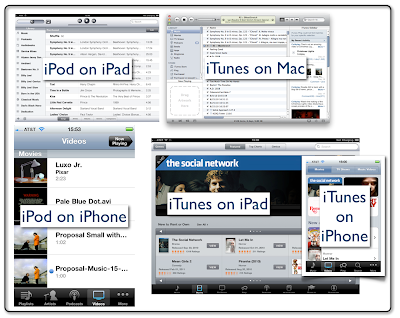
iTunes, iPod, & Videos
iTunes is a desktop app which includes access to the iTunes Store. This app is where you store, purchase, and download music, videos, and mobile apps. You also consume this content inside the desktop iTunes app with the exception of the mobile apps since they only run on the mobile devices.

However, on iOS devices such as the iPad, iPod touch, and iPhone, the paradigm is different. On these mobile devices, think of the iTunes app as only the iTunes Store for buying and downloading media such as music, videos, and podcasts.

If you want to buy and download Apps on the iPad and iPhone, then you need to use the App Store app, which is similar to the desktop App Store app for buying and downloading desktop apps.

But, on iOS devices, your music isn't accessed through the iTunes app, rather it's accessed through the iPod app (which looks very similar to the version of iTunes running on your desktop). Here's where it gets more confusing; when accessing video on your iPhone or iPod touch, you use the iPod app, but, on the iPad, you use the Videos app to play your videos.

It can be a little difficult to remember all this even if you've been along for the ride since Apple introduced the iPhone in 2007. I find myself opening and closing iTunes and the iPod apps to figure where everything is on the iOS devices. And, if you're new to Apple, it will be very confusing.