
Tuesday, November 24, 2009

Tuesday, November 17, 2009
Script Kiddies SSH Attack Solution
Are you tired of seeing attacks against port 22 (SSH) on your public servers?
The attacks generally look like the following log snippet which is a simple dictionary attack (usually against root or admin).
You could try reporting the offending IP address, but the attacking computer will frequently turn out to be a compromised Windows machine owned by grandma and grandpa.
Solution
Your best bet, after ensuring that you're using a strong password, is to have SSH listen on a port other than 22, such as 8080. Since port 8080 is usually used as an alternative to port 80, attackers will try using the http protocol to exploit it, which will fail before the attack even has a chance to begin. At this point, script kiddies will move along since there are so many other servers, with vulnerabilities, to choose from.
The attacks generally look like the following log snippet which is a simple dictionary attack (usually against root or admin).
Nov 15 07:41:58 static-171-163-154-171 sshd[5470]: Failed password for rootfrom 68.152.76.202 port 50818 ssh2
Nov 15 07:41:58 static-171-163-154-171 sshd[5472]: Invalid user password from 68.152.76.202
Nov 15 07:41:58 static-171-163-154-171 com.apple.SecurityServer: authinternal failed to authenticate user password.
Nov 15 07:41:58 static-171-163-154-171 com.apple.SecurityServer: Failed to authorize right system.login.tty by process /usr/sbin/sshd for authorization created by /usr/sbin/sshd.
You could try reporting the offending IP address, but the attacking computer will frequently turn out to be a compromised Windows machine owned by grandma and grandpa.
Solution
Your best bet, after ensuring that you're using a strong password, is to have SSH listen on a port other than 22, such as 8080. Since port 8080 is usually used as an alternative to port 80, attackers will try using the http protocol to exploit it, which will fail before the attack even has a chance to begin. At this point, script kiddies will move along since there are so many other servers, with vulnerabilities, to choose from.
Tuesday, October 13, 2009
eBay Hacked?
Today, I received some automated spam, related to eBay, through an HTML form submission on one of my websites. While researching it I opened Terminal on my Mac and typed:
Imagine my surprise when I scrolled back to the top of the results and saw this.

My immediate thought was that eBay was hacked! But, it turns out that's not the case. Running whois on the Mac just returns all results beginning with ebay.com and some people have taken advantage of that.
It's even worse if you run a whois on microsoft.com.
whois ebay.comImagine my surprise when I scrolled back to the top of the results and saw this.

My immediate thought was that eBay was hacked! But, it turns out that's not the case. Running whois on the Mac just returns all results beginning with ebay.com and some people have taken advantage of that.
It's even worse if you run a whois on microsoft.com.
Tuesday, September 1, 2009
AWS: Two Account Credentials
Amazon Web Services (AWS) now allows each AWS account to have two credentials. In other words, one AWS account can have two active Access Key ID and Secret Access Key pairs.
Do not confuse this feature with yesterday's announcement by AWS on Multi-Factor Authentication (MFA) which is similar to a SecurID fob.
Two AWS Account Credentials
AWS supports multiple concurrent access keys. This allows you to rotate keys without impact to your applications' availability. AWS recommends that you rotate keys on a regular basis. To rotate keys, create a new key below, update your applications to use the new key, and then deactivate/delete the original key.
You are allowed two access keys at any point in time, and the keys may be in the following states:
So What?
This new feature can ensure a smooth transition when rotating your keys. In the past, when you created new credentials it overwrote your old credentials. You were out of luck if you missed an application or web service that was using the old credentials. Now, you can create new credentials and update your apps. If you notice an app no longer working when you click "Make Inactive" then you can reactivate the old credentials while you fix the problem.
You can find more details when you access your AWS security credentials.
Do not confuse this feature with yesterday's announcement by AWS on Multi-Factor Authentication (MFA) which is similar to a SecurID fob.
Two AWS Account Credentials

AWS supports multiple concurrent access keys. This allows you to rotate keys without impact to your applications' availability. AWS recommends that you rotate keys on a regular basis. To rotate keys, create a new key below, update your applications to use the new key, and then deactivate/delete the original key.
You are allowed two access keys at any point in time, and the keys may be in the following states:
So What?
This new feature can ensure a smooth transition when rotating your keys. In the past, when you created new credentials it overwrote your old credentials. You were out of luck if you missed an application or web service that was using the old credentials. Now, you can create new credentials and update your apps. If you notice an app no longer working when you click "Make Inactive" then you can reactivate the old credentials while you fix the problem.
You can find more details when you access your AWS security credentials.
Twitter Redirects: Nice and Clean
Twitter's website begin counting clicks inside of tweets. Obviously, they do this to track stats, i.e. how many people click on links from the Twitter web site.
The interesting thing is that they're passing on the simple referrer that you'd expect. In other words, instead of the referrer looking like:
http://twitter.com/link_click_count?url=http%3A%2F%2Fadjix.com%2Fsx4d&linkType=web&tweetId=3696834541&userId=-1&authenticity_token=8c678e082a5ee88d47f03b05cf6f6887b8903acd
It simply looks like:
http://twitter.com/joeMoreno
This is very clean for link tracking websites like Adjix which track clicks by IP address and referrer:

Update: Just discovered a clear downside - when the Twitter website is slow, clicking on these links are painfully slow since you have to first be redirected by Twitter's servers.
The interesting thing is that they're passing on the simple referrer that you'd expect. In other words, instead of the referrer looking like:
http://twitter.com/link_click_count?url=http%3A%2F%2Fadjix.com%2Fsx4d&linkType=web&tweetId=3696834541&userId=-1&authenticity_token=8c678e082a5ee88d47f03b05cf6f6887b8903acd
It simply looks like:
http://twitter.com/joeMoreno
This is very clean for link tracking websites like Adjix which track clicks by IP address and referrer:

Update: Just discovered a clear downside - when the Twitter website is slow, clicking on these links are painfully slow since you have to first be redirected by Twitter's servers.
Monday, August 31, 2009
Twitter's "Track" Command: Gone But Not Forgotten.
 Twitter used to have a fantastic real time search command: Track
Sometime in 2008 it seems to have been turned off - probably because it generated too much SMS (text messaging) traffic.
Fire!
During the San Diego Wildfires of 2007 I was splitting my time between San Diego (Carlsbad) and Santa Cruz (Capitola). The wildfires broke out over the weekend when I was in the Bay Area. By Monday morning two separate fires were threating our home in Carlsbad. I went to sleep, Monday night, trying to prepare myself, mentally, for what it was going to be like once our home burned down.
Tuesday, as I drove down to Carlsbad, I wanted every piece of information I could find about the fires. Listening to XM channel 247 (emergency channel - a wordplay on 24/7) helped, but it was too broad since it was covering all the fires burning in San Diego, Orange County, and L.A.
This is where Twitter's Track command was a saviour (keep in mind that there were no iPhone apps back then). I simply texted some keywords to Twitter and every time someone's tweet contained one of those words it was relayed to me via SMS. I had Twitter track "Carlsbad" and the major road near my home, "Palomar".
Retweeting wasn't as popular back then as it is now so I received very few duplicate tweets. Nearly every tweet that I received - and I was receiving a new tracking tweet every five minutes - was helpful:
"It doesn't look like the fire's reached Carlsbad."
"Winds dying down and reversing direction - I can see flames from Carlsbad."
"Voluntary evacuation south of Palomar Airport Road."
"KPBS reports that fire in San Marcos, near Carlsbad, is 20% contained."
etc.
Luckily, the closest both fires got to our home was about four miles. Now, if only Twitter could bring back the Track command and ignore retweets.
Saturday, August 29, 2009
My Experiences with DNS Hosting
Overview
The Domain Name System, better known as DNS, is probably the most critical part of the Internet. DNS converts domain names, such as google.com, into IP addresses like 74.125.45.100. Since it's so important it's also the most robust and redundant Internet infrastructure in place. Attacks against this system usually go unnoticed by the public. If an attack were to successfully bring down all 13 root name servers then Internet traffic would, for all practical purposes, be unroutable - and the Internet would stop working. Luckily, each root server is actually a farm of servers which appear, from the outside world, as a single server.
Taking Down the Internet
Taking down all 13 root servers at the same time would have the effect of removing every street sign on every road in the world. Unless you know where you're going, and you've been there very recently, then your network packets used for web browsing, e-mail, etc, won't know how to reach their destination.
The Root
Top Level Domains (TLDs) are the last portion of a fully qualified domain name (i.e. .com, .net, .us, etc). To be completely correct, all TLDs end with the same character ("." pronounced "dot"). If you have a decent web browser then the following link should work: http://www.cnn.com./ (include the ending .) If this example doesn't work, then try pinging it from the command line. Think of the . as the root of DNS.
Domain Name Registration
When you purchase a domain name the registrar usually configures your DNS with some default settings. Generally, it'll point your domain to a generic landing page until you either upload your own web page or reconfigure the DNS to point to either another DNS server or web site. Once you've changed a DNS record, it can take some time until ISPs are updated. How long these updates take to propagate is configurable when creating a DNS record - the typical range is from an hour to a day.
DNS Configuration
You have two options when configuring DNS. Either you can configure it through your registrar or you can run your own DNS server. Over the past decade I've tried both methods, extensively.
DNS Self-hosting: QuickDNS Manager
In the beginning, domain registrars did not have sophisticated DNS management tools so I ran my own DNS server using QuickDNS Manager from Men & Mice (They no longer sell this great product, under this name, anymore). QuickDNS made it extremely simple to configure DNS using the QuickDNS Manager's GUI.
 Click to enlarge
In this example, the TTL (time to live) column sets how long, in seconds, third party DNS servers (i.e. ISPs) should cache this information before going back to the the registrar. The defaults in the upper right are used when the TTL column is blank for a particular record. Therefore, this DNS configuration tells third party DNS servers to cache the www.example.com and example.com records for 300 seconds (five minutes).
Although self-hosting my own DNS server gave me a huge amount of flexibility the biggest draw back was that it requires a dedicated server machine. Since running a DNS server doesn't require heavy lifting by the server's CPU, I was successful in running my own DNS server for business purposes on an old 233 MHz (Wall Street) and then later a 500 MHz PPC G3 (Pismo) PowerBook with no problem at all. The beauty of using an old laptop as a server is that its battery acts like an internal UPS. As a matter of fact, about five years ago, I used to run e-commerce web servers, mail servers, DNS servers, etc., "on the cheap" using a farm of laptop servers.
There are other many other DNS server software options, but I particularly liked QuickDNS due to its ease of use.
GoDaddy's DNS in the Cloud
These days, it's hard to beat using a DNS service that's hosted in the cloud - especially when, in the case of GoDaddy, it's free. For the cost of registering your domain name (about $10/year), you can configure your domain's DNS either through a web browser or through a text file that can be uploaded and downloaded to/from GoDaddy.
GoDaddy UIs
GoDaddy's DNS notations deviate slightly from the DNS BIND standard, but it still works as expected. Specifically, they have eliminated the need for each domain to end with a dot - after all, it's implicit. Also, when you want to reference the domain's root name (i.e. example.com) you use the @ symbol.
Here's a screenshot of how I've configured AdjixSucks.com to be a static web site hosted on Amazon's S3 (more about hosting websites on S3 can be found here):

Here's the text file, from GoDaddy, which can be downloaded, edited, and then uploaded (Be sure not to upload duplicated DNS records. If there's a duplicate record then GoDaddy will not apply any changes and return an error. This is a great safety mechanism to prevent accidents which could bring down a website.)

Using GoDaddy's web interface, you can configure your DNS record's TTL for 30 minutes, one hour, 12 hours, one day, or one week. To configure with a finer level of granularity, i.e. 300 seconds, you'll have to upload the updates to GoDaddy via a text file.
Out Source or In-house?
While there are other DNS hosting options, and some cost a small amount of money, it makes a lot of sense to use a professional DNS hosting solution instead of running your own DNS server. If you don't own the hardware then you don't have to support it. (While software may have bugs, it never fails in the manner that hardware can.) Due to the critical nature of DNS, third party hosting solutions do an excellent job at supporting this service.
The Domain Name System, better known as DNS, is probably the most critical part of the Internet. DNS converts domain names, such as google.com, into IP addresses like 74.125.45.100. Since it's so important it's also the most robust and redundant Internet infrastructure in place. Attacks against this system usually go unnoticed by the public. If an attack were to successfully bring down all 13 root name servers then Internet traffic would, for all practical purposes, be unroutable - and the Internet would stop working. Luckily, each root server is actually a farm of servers which appear, from the outside world, as a single server.
Taking Down the Internet
Taking down all 13 root servers at the same time would have the effect of removing every street sign on every road in the world. Unless you know where you're going, and you've been there very recently, then your network packets used for web browsing, e-mail, etc, won't know how to reach their destination.
The Root
Top Level Domains (TLDs) are the last portion of a fully qualified domain name (i.e. .com, .net, .us, etc). To be completely correct, all TLDs end with the same character ("." pronounced "dot"). If you have a decent web browser then the following link should work: http://www.cnn.com./ (include the ending .) If this example doesn't work, then try pinging it from the command line. Think of the . as the root of DNS.
Domain Name Registration
When you purchase a domain name the registrar usually configures your DNS with some default settings. Generally, it'll point your domain to a generic landing page until you either upload your own web page or reconfigure the DNS to point to either another DNS server or web site. Once you've changed a DNS record, it can take some time until ISPs are updated. How long these updates take to propagate is configurable when creating a DNS record - the typical range is from an hour to a day.
DNS Configuration
You have two options when configuring DNS. Either you can configure it through your registrar or you can run your own DNS server. Over the past decade I've tried both methods, extensively.
DNS Self-hosting: QuickDNS Manager
In the beginning, domain registrars did not have sophisticated DNS management tools so I ran my own DNS server using QuickDNS Manager from Men & Mice (They no longer sell this great product, under this name, anymore). QuickDNS made it extremely simple to configure DNS using the QuickDNS Manager's GUI.
 Click to enlarge
In this example, the TTL (time to live) column sets how long, in seconds, third party DNS servers (i.e. ISPs) should cache this information before going back to the the registrar. The defaults in the upper right are used when the TTL column is blank for a particular record. Therefore, this DNS configuration tells third party DNS servers to cache the www.example.com and example.com records for 300 seconds (five minutes).
Although self-hosting my own DNS server gave me a huge amount of flexibility the biggest draw back was that it requires a dedicated server machine. Since running a DNS server doesn't require heavy lifting by the server's CPU, I was successful in running my own DNS server for business purposes on an old 233 MHz (Wall Street) and then later a 500 MHz PPC G3 (Pismo) PowerBook with no problem at all. The beauty of using an old laptop as a server is that its battery acts like an internal UPS. As a matter of fact, about five years ago, I used to run e-commerce web servers, mail servers, DNS servers, etc., "on the cheap" using a farm of laptop servers.
There are other many other DNS server software options, but I particularly liked QuickDNS due to its ease of use.
GoDaddy's DNS in the Cloud
These days, it's hard to beat using a DNS service that's hosted in the cloud - especially when, in the case of GoDaddy, it's free. For the cost of registering your domain name (about $10/year), you can configure your domain's DNS either through a web browser or through a text file that can be uploaded and downloaded to/from GoDaddy.
GoDaddy UIs
GoDaddy's DNS notations deviate slightly from the DNS BIND standard, but it still works as expected. Specifically, they have eliminated the need for each domain to end with a dot - after all, it's implicit. Also, when you want to reference the domain's root name (i.e. example.com) you use the @ symbol.
Here's a screenshot of how I've configured AdjixSucks.com to be a static web site hosted on Amazon's S3 (more about hosting websites on S3 can be found here):

Here's the text file, from GoDaddy, which can be downloaded, edited, and then uploaded (Be sure not to upload duplicated DNS records. If there's a duplicate record then GoDaddy will not apply any changes and return an error. This is a great safety mechanism to prevent accidents which could bring down a website.)

Using GoDaddy's web interface, you can configure your DNS record's TTL for 30 minutes, one hour, 12 hours, one day, or one week. To configure with a finer level of granularity, i.e. 300 seconds, you'll have to upload the updates to GoDaddy via a text file.
Out Source or In-house?
While there are other DNS hosting options, and some cost a small amount of money, it makes a lot of sense to use a professional DNS hosting solution instead of running your own DNS server. If you don't own the hardware then you don't have to support it. (While software may have bugs, it never fails in the manner that hardware can.) Due to the critical nature of DNS, third party hosting solutions do an excellent job at supporting this service.
Thursday, July 23, 2009
Lunar Module Instruction Manual & STS-127
Many years ago, my neighbor, Wynne Trenholme, who's now in his mid 90s, gave me several lunar module training manuals. Tonight, I scanned one of manuals into a PDF (Introduction to the Lunar Module programmed text, March 1969). This manual introduces the student astronaut to the LM's electrical power and environmental controls along with explosive devices and propulsion & reaction controls as well as some other lunar module systems.
The other two manuals I have which are equally as fascinating:
1. Self Instruction Programmers Study Guide Lunar Module, October 1968.
2. Untitled, April 1969. This manual contains mostly diagrams of the LM-5 (Eagle).
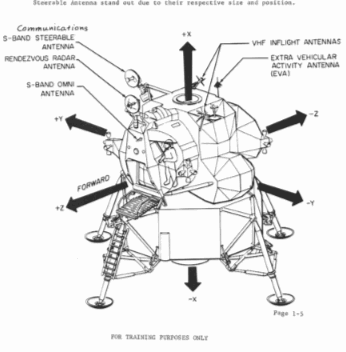 Diagram from Introduction to the Lunar Module
I've always been fascinated by the Apollo program. Especially the lunar module since it was built where I grew up (Long Island) and it was the first spacecraft designed to work entirely in the vacuum of space.
Over the past few weeks, my interest in the space program has been re-energized for two reasons. First, because of the 40th anniversary of the Apollo 11 mission. Second, because a college classmate of mine, Chris Cassidy, is currently in orbit on the space shuttle Endeavour (STS-127). I travelled to Florida to watch Chris's launch. It will probably be the only shuttle launch I'll see since there are only seven more planned before the space shuttle is retired.
Click to enlarge photos below.
 Lift off of Endeavour (15 July 2009)
 Presenting Cassidy with a USNA 1993 ball cap to bring into space.
 Cassidy's first EVA lasted 5 hours 59 minutes. (22 July 2009)
Image Credit: NASA
The other two manuals I have which are equally as fascinating:
1. Self Instruction Programmers Study Guide Lunar Module, October 1968.
2. Untitled, April 1969. This manual contains mostly diagrams of the LM-5 (Eagle).
Diagram from Introduction to the Lunar Module
Click to enlarge
I've always been fascinated by the Apollo program. Especially the lunar module since it was built where I grew up (Long Island) and it was the first spacecraft designed to work entirely in the vacuum of space.
Over the past few weeks, my interest in the space program has been re-energized for two reasons. First, because of the 40th anniversary of the Apollo 11 mission. Second, because a college classmate of mine, Chris Cassidy, is currently in orbit on the space shuttle Endeavour (STS-127). I travelled to Florida to watch Chris's launch. It will probably be the only shuttle launch I'll see since there are only seven more planned before the space shuttle is retired.
Click to enlarge photos below.
Lift off of Endeavour (15 July 2009)Presenting Cassidy with a USNA 1993 ball cap to bring into space.Cassidy's first EVA lasted 5 hours 59 minutes. (22 July 2009)Image Credit: NASA
Save the Seals
Save the Seals
Seals at the historic kiddy pool in La Jolla were kicked off the beach, again, and then their eviction was stayed, again. Lather, rinse, repeat. Should they stay or should they go?

Adam Fitch aptly described the scene at the kiddy pool, complete with photos:

As a matter of fact, nearly all Twitterers aren't happy that the seals are being kicked out. Some are "up in arms" and ready to protest:
It was hard to find anyone in favor of removing the seals. Who would want these cute little guys to be kicked to the curb? For starters, swimmers and triathletes who train there are not particularly fond of their presence since the seals bring sharks, looking for a snack, closer to shore.
But, if you "listen" closely enough, you'll find some people willing to speak their mind in favor of removing the seals. John Kelly, from San Francisco, tells San Diegian Rachel Kaplan a few of his reasons:
The decision hasn't been finalized - meanwhile, the seals continue soaking up the Southern California sun oblivious to the legal battle surrounding them.
Seals at the historic kiddy pool in La Jolla were kicked off the beach, again, and then their eviction was stayed, again. Lather, rinse, repeat. Should they stay or should they go?

Adam Fitch aptly described the scene at the kiddy pool, complete with photos:
mrfitch: Media circus for the seals at La Jolla's Children's Pool. http://twitpic.com/b80z0 http://twitpic.com/b811k As a matter of fact, nearly all Twitterers aren't happy that the seals are being kicked out. Some are "up in arms" and ready to protest:
buffynerdgirl: I am fully prepared to stand arm in arm with my fellow San Diegans in protest of the forcing out of the La Jolla seals. People suck. It was hard to find anyone in favor of removing the seals. Who would want these cute little guys to be kicked to the curb? For starters, swimmers and triathletes who train there are not particularly fond of their presence since the seals bring sharks, looking for a snack, closer to shore.
But, if you "listen" closely enough, you'll find some people willing to speak their mind in favor of removing the seals. John Kelly, from San Francisco, tells San Diegian Rachel Kaplan a few of his reasons:
JohnHedge: @Rachieheather IMO [in my opinion] the seals should be removed. They are a health hazard and their fanatic supporters take things too far. Try diving there. JohnHedge: @Rachieheather My problem with the seals is that Children's Pool is a manmade public beach and they are polluting it. It is not a sanctuary.The decision hasn't been finalized - meanwhile, the seals continue soaking up the Southern California sun oblivious to the legal battle surrounding them.
Wednesday, July 1, 2009
Entrepreneurs Connecting In San Diego With Springboard
Thinking of starting a high tech or bio-medical business in San Diego and need some help? CONNECT.org might be what you need.
Steve Hoey, a program manager at CONNECT for the past two years, says that the organization is “designed to engender and support innovation in San Diego through a culture of collaboration.” CONNECT, which was founded in 1985, has several programs and most entrepreneurs start with the free Springboard program, which first began assisting entrepreneurs in 1993.
Even in the current economic downturn Hoey points out the fact that innovation doesn't slow down. More and more entrepreneurs have taken the plunge since many people have recently found themselves out of work.
To apply for the Springboard program, which typically lasts three to five months, an entrepreneur simply fills out the application form on their website (http://connect.org/springboard). Applications are then reviewed and matched to CONNECT's subject matter experts known as Entrepreneur's in Residence (EIRs).
Each year, 50 companies go through the Springboard program and about 35 complete it. These companies range in size from one or two founding entrepreneurs, with just an idea, to companies that have raised millions of dollars in funding. Two recent success stories, which Hoey mentioned, are Benchmark Revenue Management, which helps make hospitals more effective and efficient, and Biomatrica, which stabilizes biological samples at room temperature.
EIRs will coach entrepreneurs and help them refine their business plan and fill in the gaps. For example, if an entrepreneur is technical and their plan needs help with the financial forecasts then interns can be brought in from UCSD’s Rady business school to help.
The Springboard program consists of several phases. Beginning with filling out the online application and an initial meeting with one of the 80 to 90 EIRs to ensure that the Springboard program can support the applicant’s goals. Once this match has been made, the entrepreneur will meet with their EIR several times in order to solidify their plan. The entrepreneur then refines his or her business plan by conducting a dry run in front of one or two panels of experts leading up to their final presentation panel.
The final panel consists of three groups; CONNECT sponsors, investors, and domain experts. It begins with a 20 minute presentation by the entrepreneur followed by a 30 minute question and answer period and then it concludes with about 30 minutes of feedback and constructive criticism.
Once the graduation panel has been completed, most entrepreneurs usually hope to close a round funding from investors. Since this is naturally the next step, CONNECT launched a new program in December 2008 called the Deal Network where Springboard graduates now have a second opportunity to present to investors.
The most important traits that Springboard applicants require are “coachability” and a willingness to complete the entire program. If that sounds like you and you are a San Diego based entrepreneur then CONNECT's Springboard should be your first step.
Steve Hoey, a program manager at CONNECT for the past two years, says that the organization is “designed to engender and support innovation in San Diego through a culture of collaboration.” CONNECT, which was founded in 1985, has several programs and most entrepreneurs start with the free Springboard program, which first began assisting entrepreneurs in 1993.
Even in the current economic downturn Hoey points out the fact that innovation doesn't slow down. More and more entrepreneurs have taken the plunge since many people have recently found themselves out of work.
To apply for the Springboard program, which typically lasts three to five months, an entrepreneur simply fills out the application form on their website (http://connect.org/springboard). Applications are then reviewed and matched to CONNECT's subject matter experts known as Entrepreneur's in Residence (EIRs).
Each year, 50 companies go through the Springboard program and about 35 complete it. These companies range in size from one or two founding entrepreneurs, with just an idea, to companies that have raised millions of dollars in funding. Two recent success stories, which Hoey mentioned, are Benchmark Revenue Management, which helps make hospitals more effective and efficient, and Biomatrica, which stabilizes biological samples at room temperature.
EIRs will coach entrepreneurs and help them refine their business plan and fill in the gaps. For example, if an entrepreneur is technical and their plan needs help with the financial forecasts then interns can be brought in from UCSD’s Rady business school to help.
The Springboard program consists of several phases. Beginning with filling out the online application and an initial meeting with one of the 80 to 90 EIRs to ensure that the Springboard program can support the applicant’s goals. Once this match has been made, the entrepreneur will meet with their EIR several times in order to solidify their plan. The entrepreneur then refines his or her business plan by conducting a dry run in front of one or two panels of experts leading up to their final presentation panel.
The final panel consists of three groups; CONNECT sponsors, investors, and domain experts. It begins with a 20 minute presentation by the entrepreneur followed by a 30 minute question and answer period and then it concludes with about 30 minutes of feedback and constructive criticism.
Once the graduation panel has been completed, most entrepreneurs usually hope to close a round funding from investors. Since this is naturally the next step, CONNECT launched a new program in December 2008 called the Deal Network where Springboard graduates now have a second opportunity to present to investors.
The most important traits that Springboard applicants require are “coachability” and a willingness to complete the entire program. If that sounds like you and you are a San Diego based entrepreneur then CONNECT's Springboard should be your first step.
Subscribe to:
Posts (Atom)